
Whoa there!
Looks like you’re getting a lot out of our resources — awesome! Want to get even more tailored insights that fit your specific needs? Let’s book a discovery call so we can help you achieve your goals faster.

See every client. Know where to focus first.
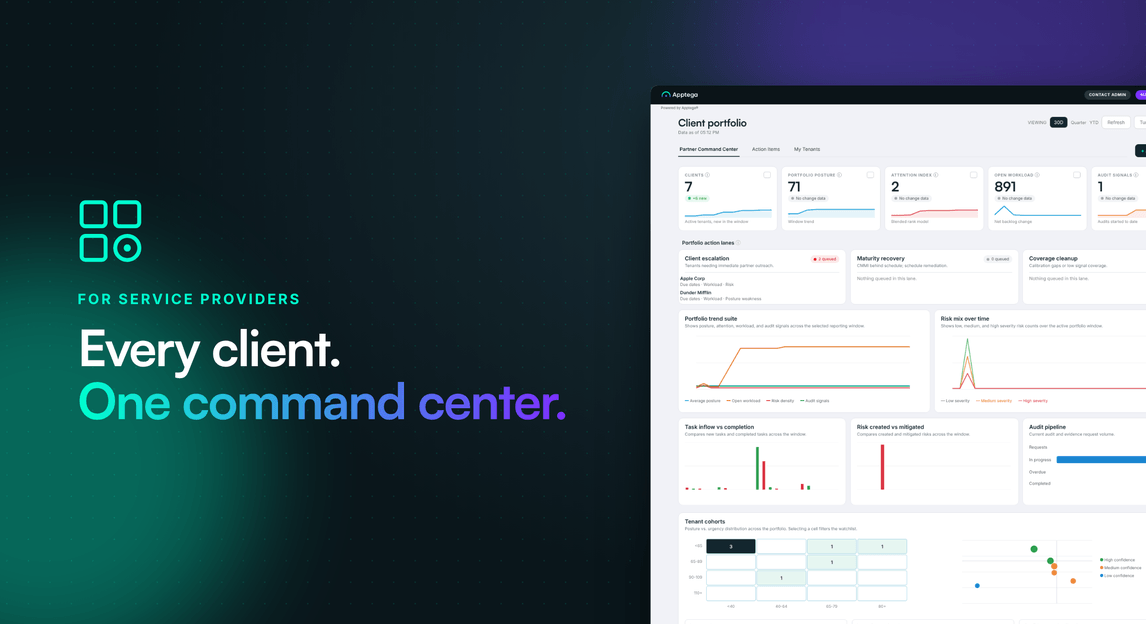
AI queues the clients that need you into priority lanes, with scoring you control, so you know where to start and why.






Deciding which client needs you next takes too long
Once a practice runs more than a handful of client tenants, deciding where to start becomes its own job.
Checking tenants one by one
Without a portfolio view, the answer comes from opening each tenant, updating a spreadsheet, or asking a consultant. The effort grows with every client you add.
One score can hide the slippage
A single score per client can look healthy while overdue work builds and an audit gets closer. A score only helps if you can count on it to decide where your time goes.
Status kept outside the platform goes stale
Spreadsheets and custom dashboards sit apart from the tasks, risks and evidence behind them. They differ by consultant and are hard to trace back to the cause, so a client can slip until an audit or escalation forces the issue.
Built for the people who run the client portfolio
From the practice leader to the consultant on the account.
vCISO practice and delivery leaders
See which clients need attention and what to work on next. Filter Action Items by client and by person to see who owns what and what is overdue, across consultants and client staff.
Managed services GMs and practice owners
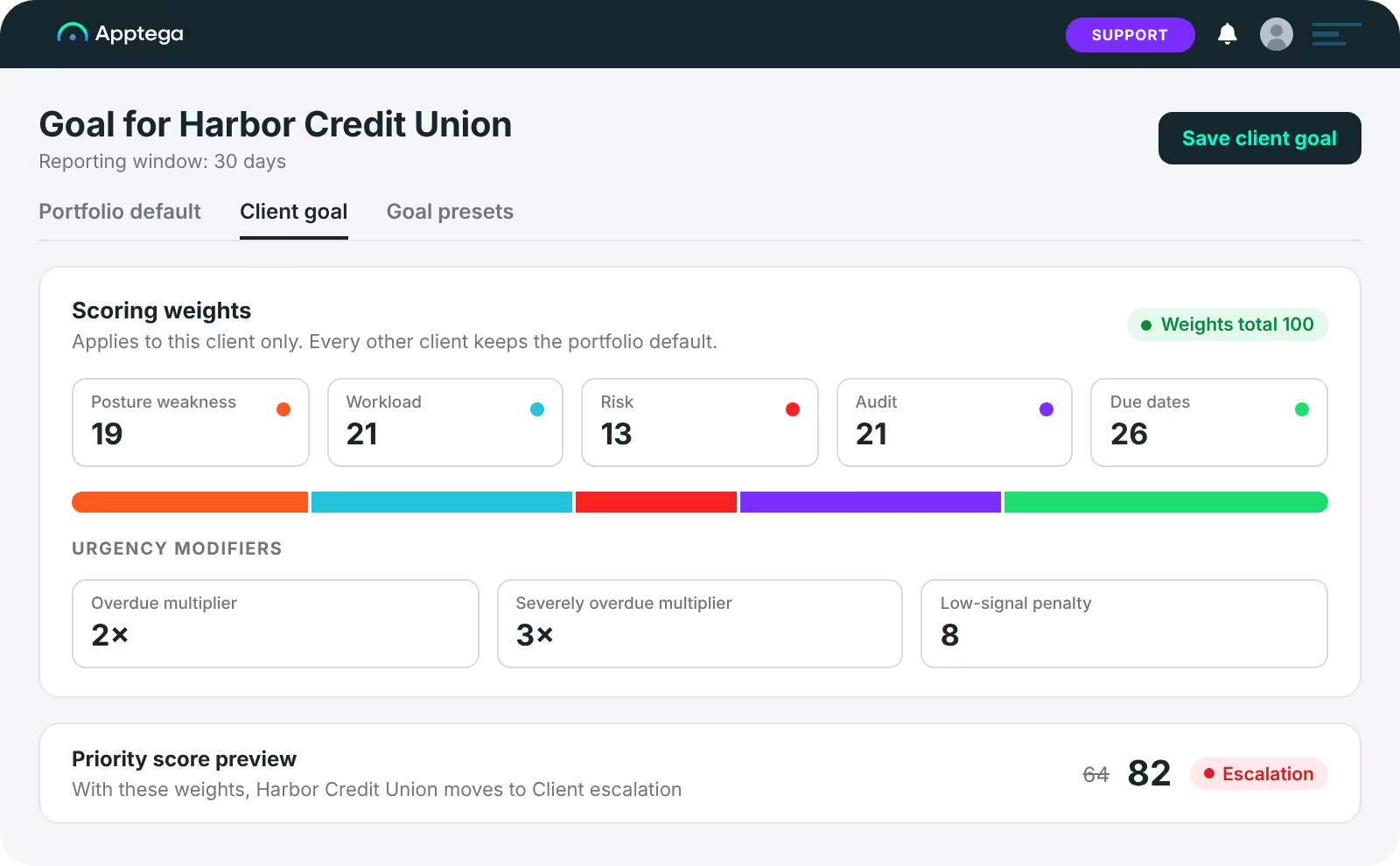
Set scoring the way your practice works. Start from a preset, tune every weight, and give each client its own goal, while the whole portfolio stays in one view as the client count grows.
Consultants and account leads
Open any client from the portfolio view and drill into its frameworks or programs to see what is behind a problem. You can see how each score is built and explain it to a client. Use the per-client view in account reviews, with trends, scoring and workload already on screen.

How Partner Command Center helps you decide where to start
Priorities come from the work inside each client tenant, and you decide how they are weighed.
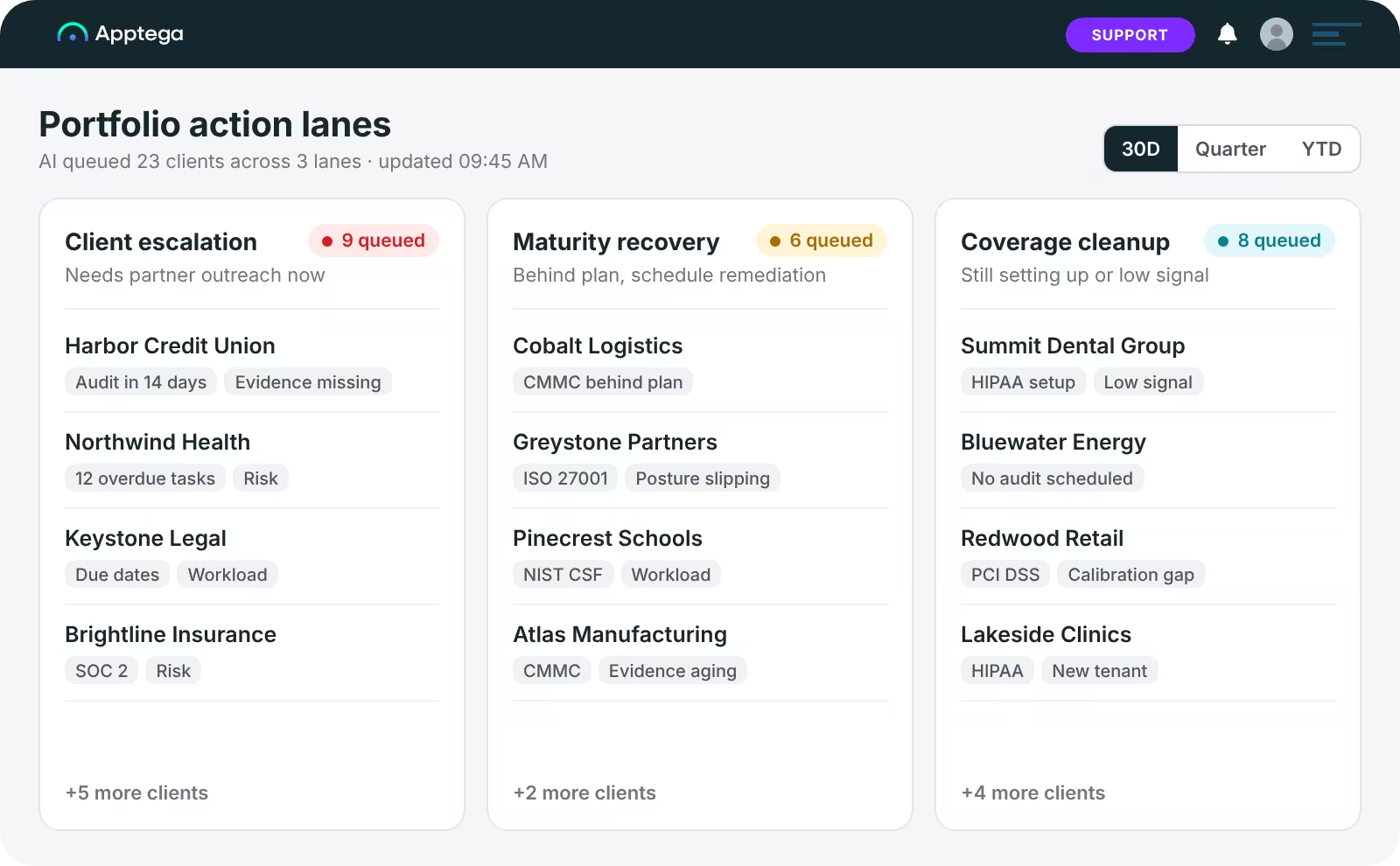
Priority lanes show where to start
AI analyzes your client data and queues the clients that need attention into one of three lanes. Client Escalation holds what needs attention now, such as an audit that is close with key evidence missing. Maturity Recovery holds clients behind schedule, such as overdue work ahead of an audit. Coverage Cleanup holds incomplete or conflicting data, such as a client still being set up, and is the lowest urgency. A client sits in one lane at a time. AI recommends where to look and takes no action.
Scoring you set, for the portfolio or per client
Choose a preset (Balanced, Risk-forward, Maturity-first or Audit-ready), or tune every weight yourself. Set a portfolio default and a goal for each client, so a first-time SOC 2 client and a mature program are measured against different targets. Scoring covers the whole program: compliance and maturity from framework progress, plus risk, workload and audit readiness. You can see how the score is built and explain it to a client.
Trends, not just a snapshot
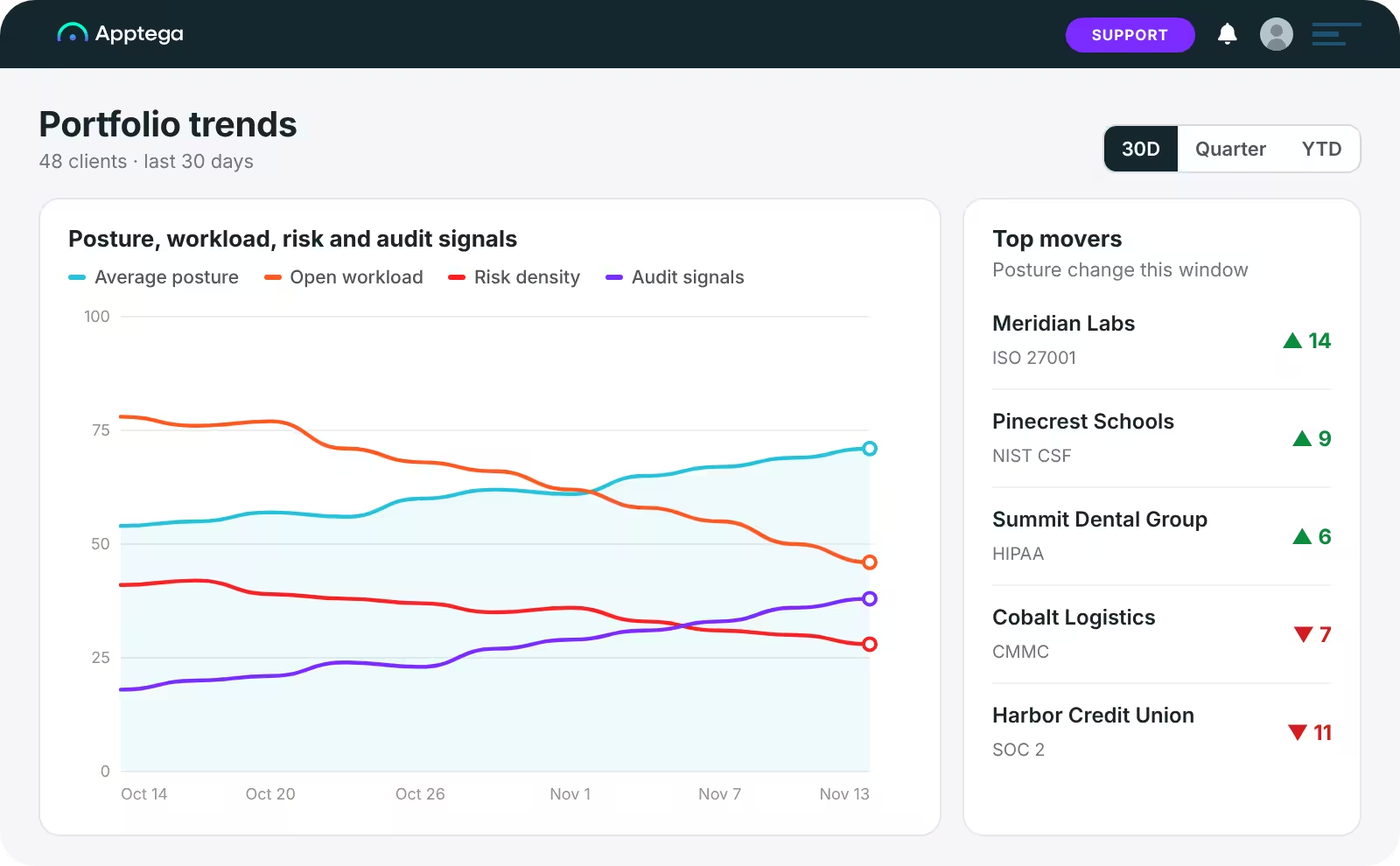
Track open workload, risk and overdue audit items over 30 days, a quarter or year to date. Top movers show which clients are changing the most, so you can see where the portfolio is getting ahead or slipping.
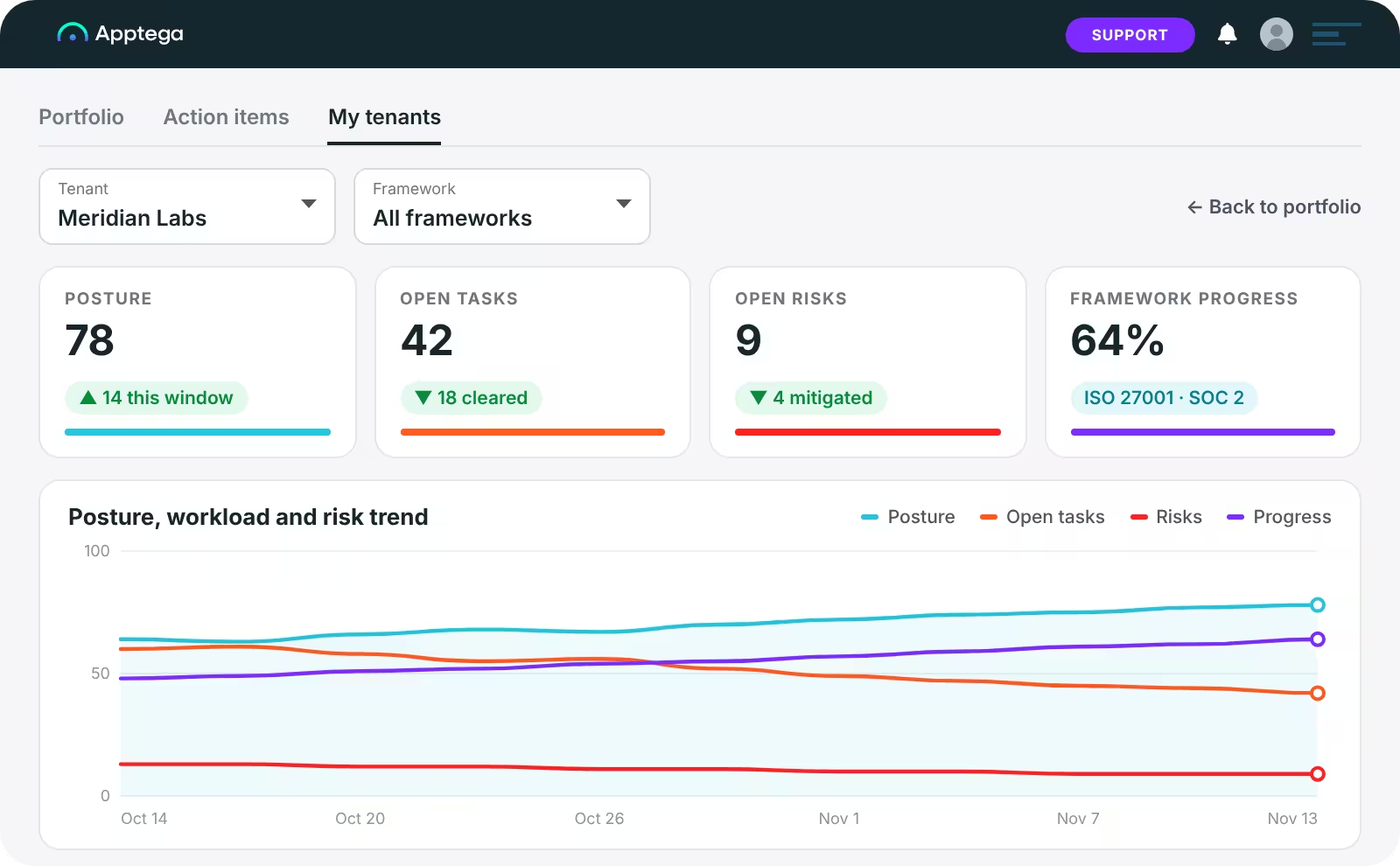
One view from portfolio to client
Start with every client in one view, then drill into any client and its frameworks or programs. Existing partners keep their previous tenant list under the My Tenants tab.
What partners say
Apptega helps service providers scale delivery, increase revenue, and improve client outcomes.

Clearly, managed compliance represents a lucrative opportunity for the relative few services and security providers equipped to offer it. Unfortunately, most lack the technology, resources and know-how to deliver an impactful assessment and follow-on program. At CyberSecOp, we've partnered with Apptega to go to market with a differentiated continuous compliance offering that allows our world-class security expertise to shine.


With Apptega, Foresite is able to go to market with highly differentiated continuous compliance offerings that empower us to better deliver and prove the value of our best-in-class cybersecurity services and consulting.


Apptega is an excellent, to-the-point, cost-effective GRC platform for MSPs and MSSPs. Quickly spin up new clients, complete assessments against a myriad of frameworks, add risk, crosswalk between platforms, get excellent support, and affordable licensing.


With Apptega, we’re able to take a cost-effective DIY approach to cybersecurity readiness and compliance. The built-in guidance for each of the sub-controls helps us quickly compare what we are actually doing with what we need to be doing. Gaps are readily identified, and remediation tasks are set up in the platform to give us a 360-degree view of our status and plans.


Until Apptega, I couldn’t find a cost-effective GRC tool that measured and assessed risk and controls well. Not only does Apptega have a better price point than anyone else, it’s a powerful platform that helps me with my reporting, gives my clients instant feedback, and holds them accountable.


Having a presentable, useful platform that both my employees and clients can use to achieve consistent, tangible results increased our efficiency and availability while also strengthening our client relationships.


Being able to cross-map between different frameworks is huge. I don’t want to have to gather the same data 16 different times.


Apptega's primary value is that it lets us organize our advisory process around the needs of our customers, and give us a better way to convey the impact of the process.

Questions about Partner Command Center

AI analyzes client tenant data to sort clients into priority lanes and track trends. It recommends where to look and takes no action. Your team decides what to do.
Yes. Set a portfolio default, then set a goal and scoring for each client, starting from a preset or tuning every weight.
Existing partners keep their previous tenant list under the My Tenants tab. Partner Command Center is the new strategic view alongside it.
No. It does not replace SecOps or vulnerability management tools. It shows where your client compliance, security, and/or risk programs need attention.
Today, Partner Command Center is designed for service providers to manage and serve multiple clients more effectively and with increased value. Clients see what is available in their tenant.
Existing partners: log in and open Partner Command Center, or ask your Partner Success Manager for a walkthrough. You need client tenants with live data to see value, and top movers need active tenants. New to Apptega: book a demo.

Learn more about running a client portfolio with Apptega Insights
Check out the latest news, resources and commentary from the Apptega team and a roster of veteran security and compliance professionals.




See which client needs you next
Book a demo to see priority lanes, scoring and client drill-down in Partner Command Center. Existing partners can log in and open it now.